Code Code Reader 1000 Instructions d'exploitation Page 113

  • Télécharger
  • Ajouter à mon manuel
  • Imprimer
  • Page
    / 120
  • Table des matières
  • DEPANNAGE
  • MARQUE LIVRES
  • Noté. / 5. Basé sur avis des utilisateurs
Vue de la page 112
Operating Instructions Chapter 11
CLV63x Bar Code Scanner
Appendix
8011970/S345/2008-04-16 © SICK AG · Division Auto Ident · Germany · All rights reserved 113
Download
Transfer process of the parameter values using the SOPAS-ET configuration software from
the PC to the connected bar code scanner.
In "Online" communication mode, the SOPAS-ET configuration software always transfers the
just modified parameter values in the background automatically and temporarily to the
working memory (RAM) of the bar code scanner with the "Immediate download" option (de-
fault setting). With this option, the current parameter values in the bar code scanner are
constantly synchronised with the modifications that are made on the user interface.
With the "Download on request" option, the user is responsible for comparing them manu-
ally. If individual parameter values have unsynchronized statuses between SOPAS-ET and
the connected bar code scanner, SOPAS-ET identifies these parameters with a blue frame.
Using the context menu (right mouse button), if necessary the modified parameter value on
a register tab (D
OWNLOAD PARAMETER VALUE) can be transferred manually to the bar code scan-
ner. Using the Communication menu, either modified parameter values only (D
OWNLOAD
MODIFIED PARAMETERS TO DEVICE) or all of the bar code scanner’s parameter values (DOWNLOAD
ALL PARAMETERS TO DEVICE) can be transferred.
The parameter values that were temporarily changed in the bar code scanner are only saved
permanently when the storage option "Permanent" (menu CLV63
X) is selected. The trans-
ferable parameter values depend on the current user level in SOPAS-ET.
Error messages
Messages in coded form with which the bar code scanner displayed a diagnosed error. The
bar code scanner differentiates between four error types: Information, Warning, Error, Fatal
Error. The error messages can be displayed in the SOPAS-ET configuration software on the
System Informationen register tab.
Ethernet interface
Physical data interface with transfer rate 10/100 MBit/s and TCP/IP protocol. The Ethernet
interface can be used alternatively to and also in parallel with the physical interfaces RS-
232, RS-422/485.
Port 2112 (Host interface) is used to output the reading result and port 2111 (Aux interface)
among other things is used to output reading diagnosis data and to monitor the data traffic
on the Host interface. The bar code scanner can be configured using both ports. If the Aux
interface data output via RS-232 is eliminated, existing communication via Ethernet re-
mains active. The same applies to the Host interface, although the data output via Ethernet
can be eliminated separately.
Function interfaces
Digital switching inputs and outputs of the bar code scanner.
Good read
The defined evaluation condition(s) were successfully met during the last reading pulse in
the reading process.
Vue de la page 112

Commentaires sur ces manuels

Pas de commentaire

Olympus CAMEDIA E-10 manuales

Manuales del propietario y guías del usuario para Videocámaras Olympus CAMEDIA E-10.
Ofrecemos 1 manuales en pdf Olympus CAMEDIA E-10 para descargar gratis por tipos de documentos: Manual de usuario
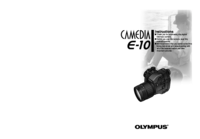

Olympus CAMEDIA E 10 Manual de usuario (203 paginas)


Marca: Olympus | Categoria: Camcorders | Tamaño: 4.15 MB |


Tabla de contenidos

Instructions

1

CAMEDIA E-10 Features

4

How to Use This Manual

5

IMPORTANT SAFETY INSTRUCTlONS

6

WARNING!

7

Handling Batteries

7

WARNING

8

CAUTION

8

Handling the Camera

8

Camera Care and Storage

9

Handling

9

Caring for Your Camera

11

Contents

12

Contents (continued)

14

Important Parts and Names

16

Control panel

18

Viewfinder

19

Getting Started

21

Everything

22

Attaching the Camera Strap

23

Battery service life

24

Do not remove

26

If insulation seal

26

Before loading batteries

27

Taking Pictures

31

Inserting a Memory Card

32

Setting the Shooting Mode and

34

Switching the Camera On

34

Checking the Battery

35

CompactFlash card

36

Not Displayed

37

Holding the Camera

38

Pushing the Shutter Button

40

Gently half-press the shutter

41

Gently full-press the shutter

41

If You Cannot Take a Picture

42

not displayed displayed

44

Shooting distance and range

45

Using the Built-in Flash

46

Flash working range

47

Viewing Pictures (Playback)

48

Cannot enter playback mode?

49

Monitor blank?

49

Enlarged display

50

The main dial and sub dial

51

Using the remote control

51

Index display

51

Protecting Pictures

52

Deleting Single Pictures

53

Switching the Camera Off

54

Shooting Techniques:

55

General Introduction

55

Blurred Background)

56

Subjects)

57

(Daylight Synchro)

58

Both in Focus

59

Shooting Moving Subjects

60

Shooting Close-up

61

Shooting Night Scenes

62

Distance and Focus

65

Using Autofocus (AF)

66

Difficult to focus subjects

68

Moving subject

69

Using Manual Focus (MF)

70

Brightness (Exposure)

71

Setting the Shooting Mode

72

Adjusting the exposure

73

Setting the Aperture Value

74

Setting the Shutter Speed

76

Manually

78

Take the picture

79

Digital ESP metering

80

Spot metering

80

Using Exposure Compensation

81

AE Lock

82

Exposures

83

Changing the ISO Setting

85

Using a Flash

87

Selecting a Flash Mode

88

Fill-in Flash

89

Red-eye Reduction

89

Red-eye

90

Reduction

90

Flash FL-40

94

Using the flash with close-up

95

Color and Quality

99

Auto white balance

100

Quick reference white balance

100

Preset white balance

100

White balance with a flash

101

Monitor display

101

Using White Balance

102

Using Preset White Balance

104

Compression

105

Resolution

106

Selecting Sharpness

108

Selecting the Contrast

109

Displaying the Histogram

110

Taking Pictures:

113

Special Features

113

Taking Multiple Exposures

114

Using the Self-Timer

115

Approx. 3m (10 ft.) (outdoor)

116

Remote mode focusing

117

To cancel remote mode

117

Using the Remote Cable RM-CB1

118

(Optional)

118

Using Time-Lapse Photography

120

Actual time interval

122

When you switch the camera on

123

Setting the Warning Sound

126

Month, Day, is displayed

128

RAW Data Mode

133

RAW Data Mode (continued)

134

Attachment

135

Playing Back Images

139

Displaying Image Information

140

Adjusting Monitor Brightness

146

Managing Stored

147

Pictures

147

Cannot copy?

149

Copying only selected images

150

Deleting All Images

152

On the arrow pad, press to

153

Press the button

153

Formatting a Memory Card

154

Naming Image Files

156

Selecting Pictures for

159

Printing

159

Copies for Printing

160

Changing the number of copies

161

To cancel print selection

161

Setting Up Index Printing

164

Index Printing

165

Stamping

166

DPOF format

168

Transferring Pictures to

169

Connection Kit

170

Switching the card

171

Windows 98, Windows 2000

172

Windows 98, Mac OS

173

Windows 2000

173

Monitor Menus

175

Setting after and

177

Playback mode menu

178

Print reserve mode menu

178

Setup/connection mode menu

178

Appendices

179

Appendix 1: Specifications

180

Appendix 2: Available Options

182

Appendix 4: Troubleshooting

184

Built-in flash does not fire

187

Monitor difficult to see

187

Pictures unsatisfactory

188

Pictures are too bright

189

Picture is too dark

189

Colors are odd

190

Date incorrect

190

Control

192

Monitor

192

Viewfinder

192

Explanation Solution

192

Glossary of Selected Terms

193

Design rule for Camera Files

194

Electro Selective Pattern

194

Digital Print Order Format

194

Exposure Value

194

Manual mode

195

Program mode

196

Shutter priority mode

196

Tagged Image File Format

197

Index (continued)

200


Más productos y manuales para Videocámaras Olympus

Modelos Tipo de documento
CAMEDIA C-3020 Zoom Manual de usuario      Olympus CAMEDIA C-3020 Zoom User Manual, 180 paginas
Zoom230 Manual de usuario   Olympus Zoom230 User Manual, 55 paginas
CAMEDIA C480 Manual de usuario   Olympus CAMEDIA C480 User Manual, 138 paginas
Stylus Wide 100 Manual de usuario   Olympus Stylus Wide 100 User Manual, 12 paginas
105 Manual de usuario   Olympus 105 User Manual, 12 paginas
Trip 500 Manual de usuario   Olympus Trip 500 User Manual, 100 paginas
Camcorder Manual de usuario   Olympus Camcorder User Manual, 17 paginas
OM-2 Manual de usuario   Olympus OM-2 User Manual, 101 paginas
E-450 Manual de usuario   Olympus E-450 Benutzerhandbuch, 147 paginas
FE-120 Manual de usuario   Olympus FE-120 Benutzerhandbuch, 139 paginas
FE-140 Manual de usuario   Olympus FE-140 Benutzerhandbuch, 80 paginas
Stylus 150 Manual de usuario   Olympus Stylus 150 User Manual, 13 paginas
Stylus 150 Manual de usuario   Olympus Stylus 150 User Manual, 2 paginas
IS-1 Manual de usuario   Olympus IS-1 User Manual, 76 paginas
Stylus Zoom 115 Manual de usuario   Olympus Stylus Zoom 115 User Manual, 70 paginas
Stylus Select 105 Manual de usuario   Olympus Stylus Select 105 User Manual, 2 paginas
Accura View Zoom 90 QD Manual de usuario   Olympus Accura View Zoom 90 QD User Manual, 2 paginas
Stylus 105 Manual de usuario   Olympus Stylus 105 User Manual, 2 paginas
Stylus 120 Manual de usuario   Olympus Stylus 120 User Manual [en] , 13 paginas
Stylus Epic Zoom 170 QD Manual de usuario   Olympus Stylus Epic Zoom 170 QD User Manual, 4 paginas